Prio1 message preferences
Note: This article is about priority 1 messages within FireServiceRota, not about priority 1 alerts!
To change your preferences for receiving prio1 messages, follow the steps below:
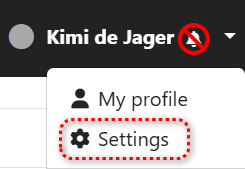
Stap 1.) Go to the 'Settings' page through your user account.
Stap 2.) Adjust your preferences via the 'Send Prio1 messages to' option.

Stap 3.) Save your changes by clicking one of the buttons below.