
Create a new duty pattern
To create a new duty pattern in FireServiceRota, follow the steps below:
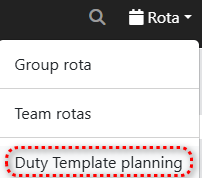
Step 1.) Go to the 'Rota' menu and navigate to the 'Duty Template Planning' page.
Step 2.) Press the 'New pattern' tab in the menu.

Step 3.) Provide a name for the duty pattern.
Step 4.) Select the user whose schedule you are going to convert into a duty pattern. This means that the user's rota will be adopted by the system and converted into a duty pattern. It is important that the user's rota is fully completed before creating the duty pattern.

Stap 5.) Set a period for the duty pattern. We recommend starting the duty pattern on a Monday and ending on a Sunday, even if no duty is scheduled on one of these days.

Step 6.) If the same availability code needs to be applied to all duties within the pattern, you can choose this availability code.
Step 7.) Press the green 'Save' button to apply the pattern.

NOTE: Remember this action copies an existing pattern already applies in the group rota to a user, so make sure to have this ready before doing the new template.