
Fair seat allocation
To keep everyone skilled and trained, it is important that incident deployments are fairly distributed. FireServiceRota can propose a seating allocation based on two methods. The fair deployment proposal is visible on the station monitor in the seat allocation widget. If deviations occur from the fairness proposal, they can be easily adjusted afterwards. Below are some frequently asked questions.
How does FireServiceRota determine who will get a seat?
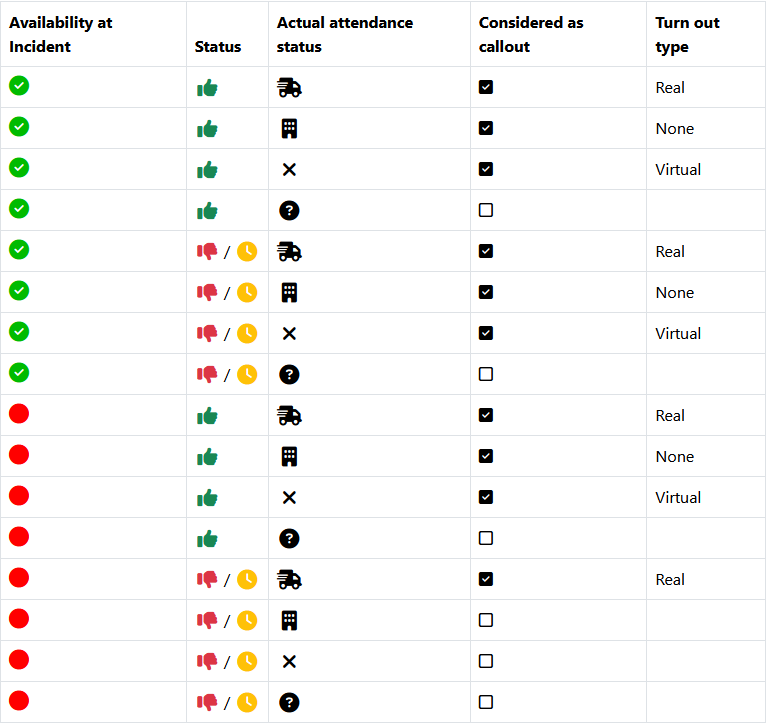
FireServiceRota determines the fairness proposal based on the following prioritization:
- Duty at the time of alert (highest priority)
- Available in a standby team at the time of alert
- Available in a unavailable team at the time of alert
- Not available but confirmed attendance at the time of alerting (lowest priority)
When there are people with the same prioritization, FireServiceRota can make a prioritization based on two methods. Both methods are described below.
Method 1: Prioritization based on last dispatch
In this method, the system makes a choice based on when someone was last dispatched to an incident. If that is not sufficient, a person is chosen at random. The system determines who is positioned where based on the required skills.
If you are not available, you will not be included in the fairness proposal. Only if there are not enough people initially and unavailable person still confirms his/her attendance, they will be included in the fairness proposal.
No account is taken of who last fulfilled a particular role; this is done on a random basis.
Method 2: Prioritization based on deployment percentage (recommended)
This method looks at the last 10 incidents, or the past year, whichever is shorter. For each incident, the system determines whether the user has responded (actual response) or if the user should have come to the station but did not (virtual response).
Finally, we divide the number of actual and virtual responses by the number of total incidents to determine the turnout percentage (see below). The higher the turnout percentage, the lower your priority for the next incident.

How does FireServiceRota show the fair seat allocation?
We have several methods to show users whether they are included in the fairness proposal. Below, we briefly describe each method.
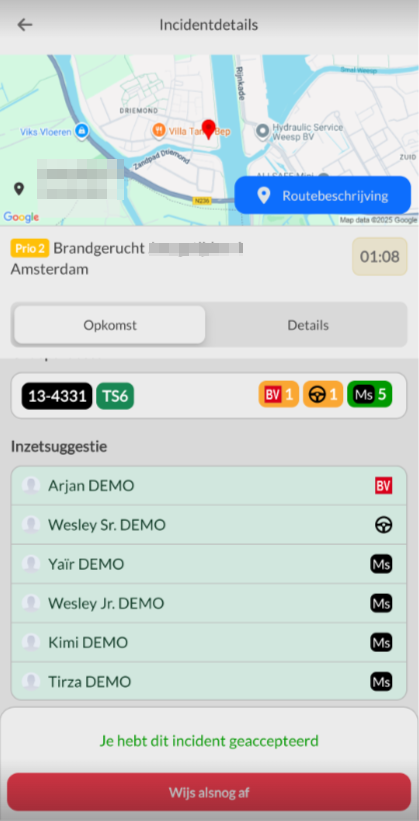
Via the app
In the FireServiceRota v4 app, it is possible to display the deployment proposal on the incident detail page. Screenshot is in Dutch, but page contents are the same in English.
Via the pager
It is possible to send a short message to the user on the Swissphone s.QUAD pager as soon as the deployment proposal is generated by the system. This message will indicate whether he/she is allocated and in which position he/she is allocated.
Via the widget on the station monitor
Through the seat allocation widget, we display the fairness proposal on the dashboard. The widget shows which users are assigned to which seats and looks as follows. Screenshot is in Dutch, but page contents are the same in English.
Can the fairness proposal also be used only for specific appliances or incident types?
It is certainly possible to use the fairness proposal only for specific appliances or types of incidents. Since this is a customized setup, it must be configured by a member of our helpdesk staff. Please contact helpdesk@fireservicerota.com for this.
Can the fairness proposal also be used without 2-way pagers?
It is also possible to use the fairness proposal without attendance confirmations from the pagers/app. In this case, a schedule is made based on who is on available. The system then assumes that everyone on available will show up. If a user declines attendance, a new calculation is made.
What should I do if the fairness proposal is not adhered to?
It can always happen that there is a deviation from the fair deployment proposal. Afterwards, it is easy to adjust by modifying the incident report. To do this, go to the incidents list, select the incident, and click on edit. Based on the fairness proposal, a number of people are dispatched (green icon with the vehicle) and a number are present but not dispatched (blue icon with the location marker). By adjusting this to the correct people, the fairness proposal will also select the right people for the next dispatch.
Report
What information can I find in the report?
The system also includes a report on the fairness proposal. This report shows various things, such as:
- Figures based on a specific appliance
- Figures based on a specific skill
- Figures on individual level
Because the reporting for the fairness proposal is too extensive to capture in one article, we have set up a virtual tour in the system. This tour takes you through all the important points of the fairness proposal.
Can I favor someone in the fair deployment proposal?
It is possible to favor someone in the fairness proposal. This can be done through the edit page of the report. You can open this by pressing the yellow edit button in the report.

It is possible to "boost" someone as a whole, or only on skill level. To do this, press the "forward" button in the desired column. When boosting only on skill level, the user will be classified based on the skill they are boosted on, if their score is sufficient to be assigned automatically at all. To give someone a greater chance of being assigned automatically, you can boost the user as a whole.
Of course, we also have a function that does the opposite; for this, press the "stop" button.
I boosted someone, but they still weren't assigned, how can this be?
It is possible that if other users have a score of 0, the boosted user may still not be assigned.
Can I see if someone was boosted at the time of the alert?
You can! In the incident registration on the website, the forward icon will be displayed before the user's name. Of course, this is the same the other way around (at the stop button).